
The AI workspace
that actually teaches.
Live code, voice, camera, and screen sharing — all wired into one tab. A student asks a question, Python runs in the browser, and a voiced tutor explains the output while seeing their screen.
Free accounts for students and faculty. No credit card required.
The student asks. Code appears.
Type a question. The studio writes code in the editor and Python runs in the browser via WebAssembly — no install, no server, no execution bill at any class size.
Share the screen. The tutor responds out loud.
One click starts screen sharing or opens the camera. A voiced tutor sees what is on the display and explains the output — in real time, in the student's own words.
Export. Keep it. Show it off.
Every build downloads as a file — code, PDF, slides, or a working app. Share a thread publicly so others can discover and fork it. The work compounds.
Every module, open at once.
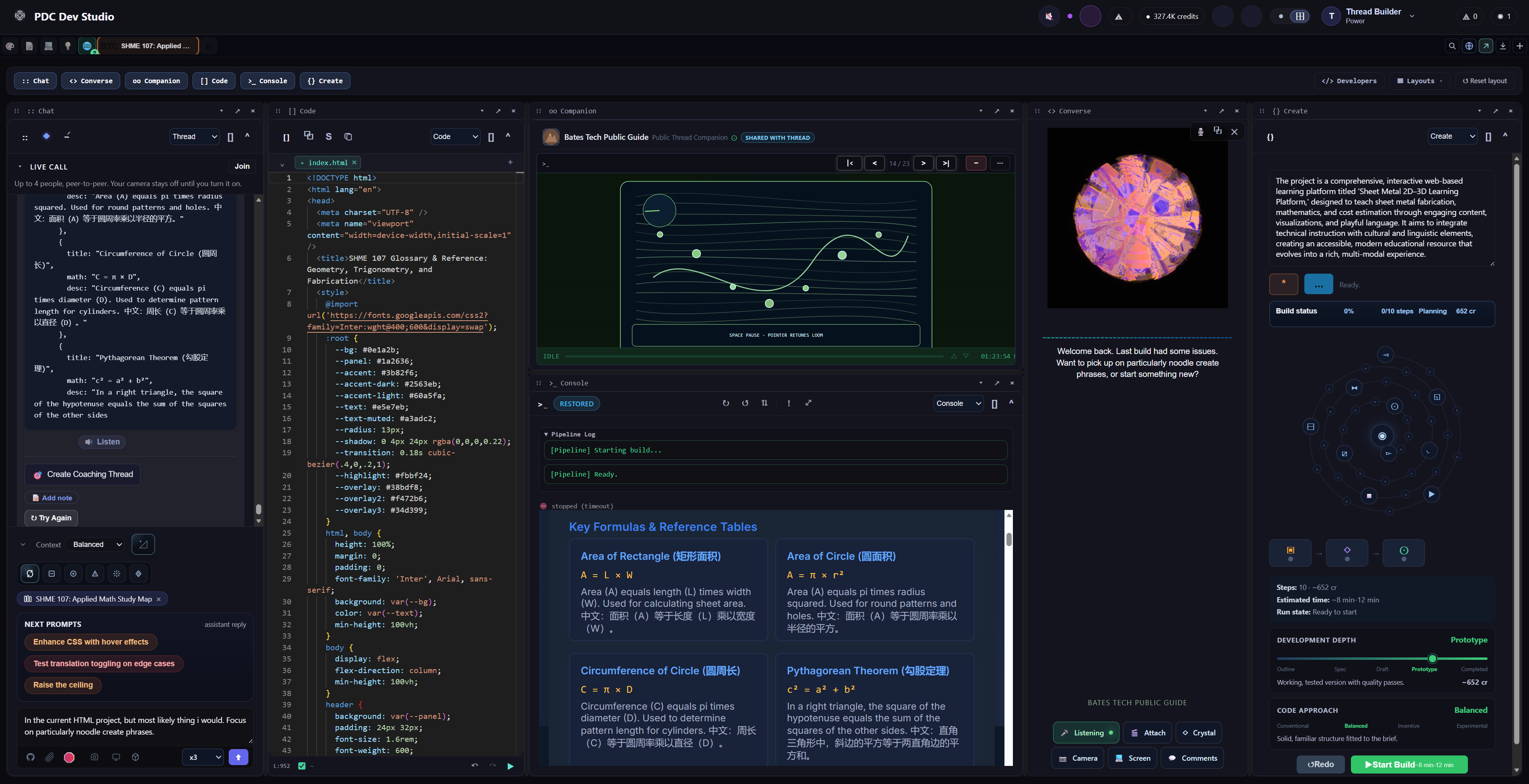
Chat, Code, Companion, Console, Converse, and Create — all running side by side. This is the live product, not a mockup.
Active learning outperforms lecture.
The research has been settled for a decade.
PDC Dev Studio operationalizes an already-proven pedagogical effect at near-zero marginal cost per student.
The thesis, in one sentence: All learners benefit from interactive experiences — and the students furthest behind benefit most. PDC Dev Studio makes that experience accessible at classroom scale, without a server bill for code execution.
Four things no other AI tool does in one tab.
Python runs in the browser. No server required.
The Monaco code editor and Pyodide (Python via WebAssembly) run entirely client-side. No installation, no cloud execution bill, no infrastructure to manage — at any class size. JavaScript runs the same way.
Voice, camera, and screen — the tutor sees what the student sees.
The Converse surface opens a live voice session with a voiced AI tutor. Students share their screen or camera with one click. The tutor sees the display, hears the question, and responds out loud — in context, without switching tools.
Course materials, slides, and apps — exported, not just generated.
The Create module produces PDF reports, PPTX slide decks, spreadsheets, websites, and working apps. Attach images, audio, video, PDF, and ZIP files in chat. Every deliverable downloads or shares publicly in the gallery.
Structured coaching threads — live, guided, ready in minutes.
The Coaching Wizard turns a conversation into a video-based tutoring, feedback, or check-in session using a ready-made template. Every account gets the basics; deeper templates for lesson guidance, interviews, and onboarding open up as you go.
Zooid Colony
/ˈzoʊ.ɔɪd/ · ZOH-oyd · noun — one specialized member of a colony; it only works as part of the whole.
A Zooid is a small, specialized worker that runs on your lab's own computers — triaging data, drafting analysis code, or watching a long-running job — driven by a plain-English purpose you set, on your own local models, with nothing metered per run. Zooids live in a Colony: a shared sandbox on your machines where each one keeps its own specialty and hands off to the next. Keep a Colony Local to one machine, share it across your lab's registered computers, and — soon — connect to the Public Colony.
Under the microscope: Zooids activating one another inside a Colony. Local and Shared today; the Public Colony is in development.
Not a chat tool. Not a textbook replacement.
Generic AI tools explain content. Static materials present it. PDC Dev Studio is where a student actually builds something.
| Generic AI chat | PDF / Textbook | PDC Dev Studio | |
|---|---|---|---|
| Explains concepts and code | ✓ | ✓ | ✓ |
| Runs code live in the browser | ✗ | ✗ | ✓ |
| Python runs client-side — no server bill | ✗ | ✗ | ✓ |
| Voiced tutor responds out loud | ✗ | ✗ | ✓ |
| Sees the student's screen and camera | ✗ | ✗ | ✓ |
| Accepts image, audio, video, and PDF in chat | ✗ | ✗ | ✓ |
| Exports builds as portfolio pieces | ✗ | ✗ | ✓ |
Bring your own mascot to life.
Not a static logo — a speaking, responsive guide, grounded in your own programs and policies.

Chester is our working prototype — every campus gets its own.
Chester is a real-time animated guide built on our mascot engine, not a picture with a chat window bolted on. Your own mascot works the same way: your character, your school's voice, grounded in your catalog and policies. Available as an add-on alongside your pilot, or anytime after.
Ask about a branded mascot for your campus →One course. One champion. This semester.
Start with one course today. No IT sign-off. Want the whole department? Department pilot ↓
In the browser. Any class size.
Like course materials.
For faculty. Rolls over.
Free to start. No credit card.
Students and educators at these schools
have access to the full workspace.
Community colleges highlighted — the platform fits ZTC degree program requirements and inclusive-access billing.
Request to be added to the network.
We'll index your school's public course catalog and notify you when threads are ready.
Start a department pilot.
One department. One semester. Free.
- 1Faculty champion
- 2Intro session
- 3End-of-term review
Then convert to a paid package, or stop. See institutions →
Start a pilot this semester.
One department. One semester. Free.
dev.primarydesignco.com